• Wednesday, February 15, 2012

Previous

Next

Digital Office Hours

January 22, 2010, 3:15 pm

I’m on campus a lot less this year than I have been in the past. The cause of this is a 120-mile, one-way commute. I arrive at campus at 8:45 am, teach straight from 9:30 am until 3:15 pm, and then hold office hours from 3:30 – 5:00 pm. The result is that I am available to meet individually with students for a total of 3 hours each week. My experience suggests that this amount of office hours is more or less average. But there’s a decided disadvantage in that many of my students aren’t able to meet with me during that time given their other classes or commitments. If I lived closer to my campus, I could follow George’s example and use Jiffle or Doodle to work with students to schedule meetings or other possible office hours. My solution has been to offer digital office hours.

Instant messaging (IM) services like AIM, Yahoo! Messenger, or Windows Live Messenger make it possible for you to chat in real-time with friends, colleagues, and students. Google integrated chat into its email service, Gmail, in 2006, and even Facebook added a chat feature in early 2008. So the chances are good that your students will have accounts on one or more of these services. If you do as well, then you can simply let your students know your account name (so they can find you) and when you will be available to chat with them. Julie indicates that her students have always been respectful of her status when she is logged in, and students only chat with her when it is their designated time.

But do you really want to have all of these different tools open at once? Probably not. In order to cut down on applications or screens that you have open on your desktop, you can use an IM aggregrator. Such a tool allows you to log into multiple IM services at once; students can reach you via any service that they prefer, but you only have one window to deal with. Julie recommends Digsby for such a service. Digsby allows you not only to manage all of your IM streams, but also works as an email manager for web-based mail and as an interface for social networking sites such as Twitter and Facebook. It is Windows-only at the moment, but is “coming soon” for Mac and Linux. Mac users have their own choices for IM aggregators, such as iChat or the more robust Adium. If you don’t feel like downloading and installing yet another application to your computer(s), you can also use the web-based meebo.

But what if you don’t want to give your students your IM account name? That’s the position I found myself in. I could of course create a new account for just digital office hours, but that seemed like one more thing that I would have to check and thus not especially ProfHacker-ish. I found a solution with Google Talk chatback badges.
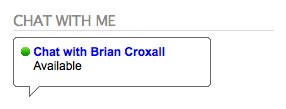
The badge is a short snippet of HTML that I can plug into any of my course-related websites, and the result is that anyone who visits the website can click on the chatbox to start a conversation with me–(1) whether they have a Google Talk account or not or (2) whether or not they know my IM account name. (Full disclosure: I got my inspiration to offer digital office hours when I first saw the Google Talk chatback badge on the blog of Tom Scheinfeldt, who is Managing Director of the Center for History and New Media [the home of Zotero!]. Tom has since removed the plug-in from his blog; I think I bothered him chatted with him too much.)

Since I’m a devotee of all things Google, I am frequently logged into my Gmail account, so it’s very convenient for me to use this tool for my digital office hours. And when I’m done with the office hours, I simply set my status to unavailable, and it becomes impossible for anyone to click on the link. The one downside is that Gmail cannot tell me whom I’m chatting with, since my interlocutor isn’t logged in. So I’ve told my students that my first question will always be to ask who I’m speaking with, and that problem is quickly solved.

I’ve found that my students do not frequently take advantage of my scheduled digital office hours. But then again, they don’t stop by my regular office hours all that frequently. I have told them, however, that they can always chat with me if I’m shown to be available, and I will frequently set it as so as I’m doing class preparation at night. I’ve found that I get into conversations with students most frequently after 10pm. That might be too late for many, but since I have control over whether I’m shown as available or not, I don’t mind them chatting with me when I’ve made it clear that I am available.

Do you offer digital office hours? How do you manage them? Do you find that students make use of them?

cc licensed flickr photo by mkosut

This entry was posted in Productivity, Software, Teaching and tagged , . Bookmark the permalink.

  • Print
  • Comment (12)

12 Responses to Digital Office Hours

Julie Meloni - January 22, 2010 at 3:43 pm

Good post, Brian. A clarification on how I use IM w/ students, should anyone care…it’s true that students have always been respectful of my status, but I don’t have a designated time. The rule is “if I’m online and my status says “available” that means I’m available, no matter the time.” So, I guess it’s even better that students have always respected the status.

I will also note that with Digsby, you can get a Digsby IM widget to put on your web site or blog, much in the same way you mention the GTalk widget above. I’m a big fan of clients like Digsby; Mac users shouldn’t fret that Digsby is currently Windows-only, because Adium is pretty great by all accounts. In fact one of the biggest feature requests that I see on the Digsby forums is “make it like Adium” :)

Digital office hours, or just simply online access to me (the instructor) is important for my students because of a situation similar to Brian’s—my commute is 142 miles one-way and I don’t have physical office hours at all. Hooray for the Internet.

Tad - January 22, 2010 at 4:25 pm

Digital office hours are convenient even if you don’t have a mad long commute.

I’ve found that some students are far more comfortable talking via IM– some of whom would never dream of showing up physically at your office.

And another means of conducting them that warrants mention is meebo– it’s a web-based IM aggregator, so you can conduct digital office hours even when away from your own computer. They also have a nice app for Android and iPhone, if you wanted to conduct your office hours while, say, stuck on a city bus.

Rachael Sullivan - January 22, 2010 at 3:54 pm

Hi Brian,
Thanks for the post! Since you helped me with the Google Talk chatback badge, it has been working great. I actually find that students are using it more than I thought. Most students just have quick questions, but those kinds of questions are well suited to the chat format. No need to meet in person for those. I also find that the most popular time is after 10 pm. The only thing I would add is that I had to get the Flash plug-in working on my browser (Firefox) before the sound notifications would play from Gmail. I realized that I was missing messages because there was no sound to notify me if I happened to be reading something at my desk or in another browser tab. Most people probably have the Flash plug-in already, but for some reason I didn’t.

Ryan Hoover - January 22, 2010 at 4:25 pm

I’ve used meebo for a couple semesters now for online office hours. It has a badge/widget that works similarly to Google’s (and maybe Digsby?). One advantage I find with meebo is the meebo notifier, a little app that runs in the background and will notify you of any incoming messages. I have my notifier set to log me into meebo whenever the computer is woken up, thereby giving me the constant online presence that Julie refers to.

One kicker is that I have to remember to log out in the evenings. I have had students ask for help on assignments at 11pm, not exactly when I’m in the best of advising moods.

Julie Meloni - January 22, 2010 at 4:47 pm

I’ve found that I’ve become far more diligent about status messages since I put myself in a position where they would be important — I’m happy to answer questions about things at 11pm, but not ALL the time…sometimes I might be online at 11pm because I’m writing, or playing a game (shhhh…)

William Patrick Wend - January 23, 2010 at 4:51 pm

Here is what I do:

I do “EOffice” hours on Wednesday nights from 8pm-10pm. During that time, my email is open and I am available for chat (GTalk, Yahoo, AIM, etc). I am also chatting during my office hours M-F from 10am-11am. I used Pidgin in Linux to build the screen names I created for this right into what I already do. I just type in the password when I want to log in.

Brian Croxall - January 23, 2010 at 12:17 am

Thanks, Tad and Ryan for these additional comments about meebo. I should have made it more clear in my post what the advantages are for using a web-based aggregator. The portability of access is certainly important.

I have also noticed like Tad that I have some students who far prefer to talk with me over IM. And since it’s not hard for me to engage with them this way, I’m glad to have at least some one-on-one contact with the students, since I think it’s often one of the best times to really do some teaching.

Brian Croxall - January 25, 2010 at 10:47 am

Thanks for this perspective, Cardinal. I haven’t really thought about times when it would be desirable to have multi-user chat, but review sessions would be just that. I haven’t really been able to hold review sessions in the way that I normally would due to my lack of time on campus. I’ll have to think about if this is worth integrating this semester. Did you find that the sessions were well attended?

Cardinal - January 25, 2010 at 9:22 am

I don’t have weekly on-line office hours but I often do so the evening before an exam or a due date. I announce the scheduled chat time in class and at the designated time I just start a public chat in Skype and post the link to the public chat on the course webpage. That way everyone who’s on-line can see everyone else’s questions. Afterwards I post the transcript of the chat to the webpage.

A. - January 25, 2010 at 4:04 pm

I have long made myself available to students via AIM, and have a specific screen name that I use for that purpose. I’m a librarian and I teach a 3-credit class, so I could have a student from, say, a history class I taught three weeks ago IM me as well as one of my continuing students. I have a MeeboMe widget embedded in the CMS for my online course, and have the widget in any research guides I create.

I like to keep things simple, so I use Adium to aggregate my AIM and Meebo messages, it just requires a little tweaking. (If you’re on a PC you can use Pidgin.)

I played around with Digsby before the current release that apparently includes a lot of garbage apps that are also installed. I liked it before — not so much now.

The Meebo Pidgin plugin is available at http://jrpomeroy.com/pidgin/ and here’s the Meebo Adium info http://www.wiseguydigital.com/wiseguy-digital-blog/adiumx-meebome.html

Julie Meloni - January 25, 2010 at 4:45 pm

Point of clarification for anyone passing by these comments: Digsby has always included opt-in/opt-out of various things as part of the installation process. It is easy to opt-out of everything, as I have. No garbage runs on my machine.

Pidgin is also an aggregator for Windows (etc) that many people like. Gold standard aggregator tends to be Adium, although Mac-only.

Cardinal - January 25, 2010 at 7:37 pm

Brian, I think about 20-25% of students showed up; more than I’d expect to see in live office hours. I don’t know how many checked the transcript afterwards but several mentioned that they had.

  • The Chronicle of Higher Education
  • 1255 Twenty-Third St, N.W.
  • Washington, D.C. 20037